Can I Change the Mac Address of My Printer
You can change your printer’s MAC address, but it’s usually tricky and depends on your printer model. Most MAC addresses are fixed in hardware by manufacturers, so altering them often needs special software or firmware tweaks, and might void warranties.
Changing it can also disrupt your network connection or cause issues with device recognition.
If you want to explore why and how this can be done safely, it’s important to understand the risks involved. There are also alternatives to changing the MAC address that might better suit your needs.
Keep considering the details ahead to make an informed decision.
Key Takeaways
- Printer MAC addresses are factory-assigned and embedded in hardware, making changes difficult and often unsupported by standard user interfaces. Some brands provide specific tools or firmware options to modify MAC addresses, but this varies widely across manufacturers.
- Changing a printer’s MAC address can cause network conflicts, disconnections, and issues with IP assignment or MAC filtering. Unauthorized MAC changes may violate network policies or laws and risk voiding printer warranties or damaging the device.
- Alternative solutions like firmware updates, restarting devices, or assigning static IPs are safer first steps to resolve network problems.
Understanding the MAC Address and Its Purpose
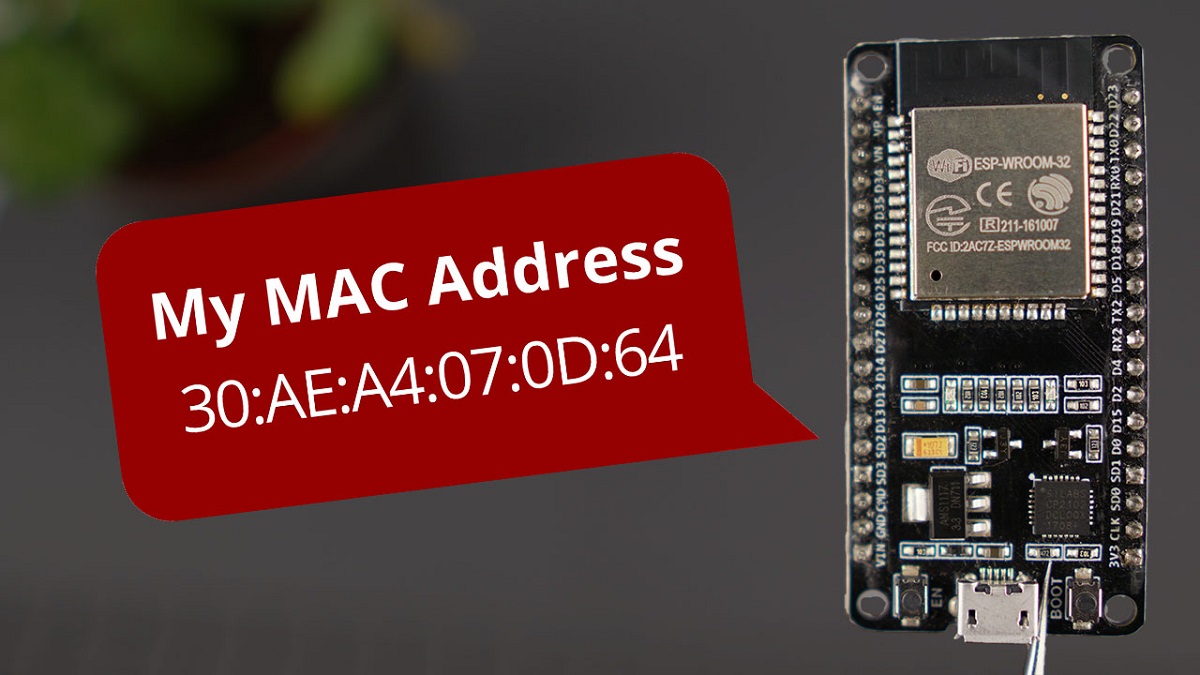
Although you might not think about it often, your printer’s MAC address plays a crucial role in how it communicates on your network. This unique identifier is like your printer’s digital fingerprint, ensuring it can be recognized among all other devices. When your printer sends or receives data, the MAC address helps direct that information correctly within your local network.
Unlike an IP address, which can change, the MAC address stays fixed, making it essential for reliable communication. Knowing what the MAC address does helps you understand why some network features or restrictions might be tied to it. So, when you manage your network or troubleshoot connectivity, remembering the importance of the MAC address can make a big difference.
How MAC Addresses Are Assigned to Printers
When you connect a printer to your network, its MAC address is assigned by the manufacturer and permanently embedded into the device’s hardware. This unique identifier is typically programmed into the printer’s network interface card during production. The MAC address follows a standardized format, with the first half representing the manufacturer’s unique code, and the second half identifying the specific device.
Because it’s hardcoded, you usually can’t alter it through normal settings. This helps guarantee each device on a network has a distinct address for communication. While the MAC address is fixed at the factory, it plays an essential role in how your printer interacts with routers and other networked devices, allowing seamless and secure connections.
Reasons You Might Consider Changing Your Printer’s MAC Address
You might consider changing your printer’s MAC address to boost network security by preventing unauthorized access. It can also help protect your privacy by making your device harder to track.
Understanding these reasons can guide you in deciding if this step is right for you.
Network Security Enhancement
Since your printer connects to your network just like any other device, its MAC address can be a target for hackers looking to gain unauthorized access. By changing your printer’s MAC address, you add a layer of security that makes it harder for attackers to identify and exploit your device. This can help prevent network breaches, especially if your printer’s original MAC address is publicly known or easily discoverable.
Additionally, altering the MAC address can help you manage network access controls more effectively, blocking devices with known addresses and allowing only trusted ones. Overall, changing your printer’s MAC address can be a proactive step to strengthen your network’s defenses and reduce vulnerabilities that arise from predictable device identification.
Privacy and Anonymity
Although printers are often overlooked in discussions about privacy, their MAC addresses can reveal more about your network activities than you might realize. Changing your printer’s MAC address can help protect your privacy and maintain anonymity on your network.
Here’s why you might consider it:
- Prevent tracking by external parties monitoring your network devices.
- Avoid profiling based on device types connected to your network.
- Reduce the risk of targeted attacks aimed at known devices.
- Maintain anonymity when using public or shared networks where your printer is accessible.
Technical Challenges in Modifying Printer MAC Addresses
When attempting to change a printer’s MAC address, you’ll quickly encounter several technical hurdles that aren’t present with other devices. Unlike PCs or smartphones, printers usually have firmware that tightly controls network settings, including the MAC address. This firmware often lacks user-accessible options to modify hardware identifiers.
Additionally, printers have embedded network interface controllers (NICs) with permanently assigned MAC addresses, making changes difficult without specialized tools. Even if you access the printer’s configuration interface, it typically doesn’t allow MAC address edits. Another challenge is that altering firmware or hardware can void warranties or brick the device.
Because printers are designed for stability and security rather than customization, these technical barriers make changing the MAC address a complex and risky endeavor.
Methods to Attempt Changing the MAC Address on Different Printer Brands
Different printer brands may have unique ways to adjust their MAC addresses, so you’ll want to explore brand-specific settings or tools. Sometimes, updating or modifying the printer’s firmware or using specialized software can help you make these changes.
Keep in mind that the options available depend heavily on the manufacturer and model you’re working with.
Brand-Specific MAC Tweaks
Since each printer brand handles network settings uniquely, the steps to change your printer’s MAC address can vary substantially. You’ll need to explore specific tweaks based on your printer’s make. Here are some approaches to examine:
- HP Printers: Some models allow MAC address changes via embedded web servers; check the network settings page.
- Canon Devices: Often restrict MAC changes, but advanced network menus might offer limited options.
- Epson Printers: Occasionally support MAC editing through service mode or hidden menus; access varies by model.
- Brother Printers: May allow manual MAC entry during initial network setup or in specialized admin menus.
Before attempting, back up your settings and consult your printer’s manual or support forums for brand-specific guidance.
Firmware and Software Options
Although changing your printer’s MAC address isn’t always straightforward, exploring firmware updates and specialized software tools can often provide solutions tailored to your device. Some printer manufacturers release firmware that allows network settings adjustments, including MAC address changes. Check your printer’s support page for firmware updates or utilities that might enable this feature.
Alternatively, third-party software like network configuration tools or MAC address changers can sometimes override default settings if your printer connects through a PC. However, compatibility varies widely between brands and models, so it’s crucial to verify that these tools support your specific printer.
Impact of Changing the MAC Address on Network Connectivity
When you change your printer’s MAC address, you might notice immediate effects on how it connects to your network. Since the MAC address uniquely identifies your device on the local network, altering it can disrupt existing connections. Here’s what you might experience:
Changing your printer’s MAC address can temporarily disrupt network connections and affect device recognition.
- Loss of network recognition – Your router may treat the printer as a new device, causing temporary disconnection.
- IP address reassignment – DHCP servers might assign a different IP, affecting print jobs relying on the old address.
- Access control issues – If your network uses MAC filtering, the printer could be blocked until you update the allowed list.
- Potential connectivity delays – Your printer may take longer to reconnect as the network adjusts to the new MAC address.
Understanding these impacts helps you manage connectivity smoothly after a MAC change.
Legal and Ethical Considerations When Altering MAC Addresses
Before you decide to change your printer’s MAC address, it’s important to understand the legal and ethical implications involved. MAC addresses uniquely identify devices on a network, so modifying them can sometimes violate network policies or terms of service. In some regions, changing MAC addresses with intent to bypass restrictions or commit fraud is illegal.
Ethically, you should avoid using a MAC address that belongs to another device, as this can cause network conflicts and disrupt services. Always ensure you have permission from your network administrator before making changes. Altering a MAC address for legitimate reasons, like troubleshooting or privacy, is generally acceptable.
However, staying informed about local laws and respecting network guidelines will keep you on the right side of both legality and ethics.
Alternative Solutions for Printer Network Issues Related to MAC Addresses
If you’re experiencing network issues with your printer related to its MAC address, there are several alternative solutions you can try before deciding to change the address itself. These options often resolve connectivity problems without the risks of altering hardware settings.
- Restart Your Printer and Router – A simple reboot can clear temporary network glitches.
- Update Firmware – Ensure your printer’s firmware is up-to-date to fix bugs affecting network communication.
- Check MAC Filtering Settings – Verify your router’s MAC filtering list to ensure the printer’s address isn’t blocked.
- Assign a Static IP – Instead of changing the MAC, assign a static IP to stabilize the printer’s network presence.
Trying these steps first can save you from unnecessary complications and keep your network secure.
Frequently Asked Questions
Can Changing My Printer’s MAC Address Void Its Warranty?
Yes, changing your printer’s MAC address can void its warranty since it’s considered unauthorized modification. Manufacturers typically don’t support hardware alterations, so you should check your warranty terms before making any changes to avoid losing coverage.
Will Changing the MAC Address Affect My Printer’s Firmware Updates?
Think of your printer’s firmware updates as a river flowing to a specific destination. Changing the MAC address might reroute the flow, causing update failures or delays, so it’s best to keep it unchanged for smooth updates.
How Can I Find My Printer’s Current MAC Address?
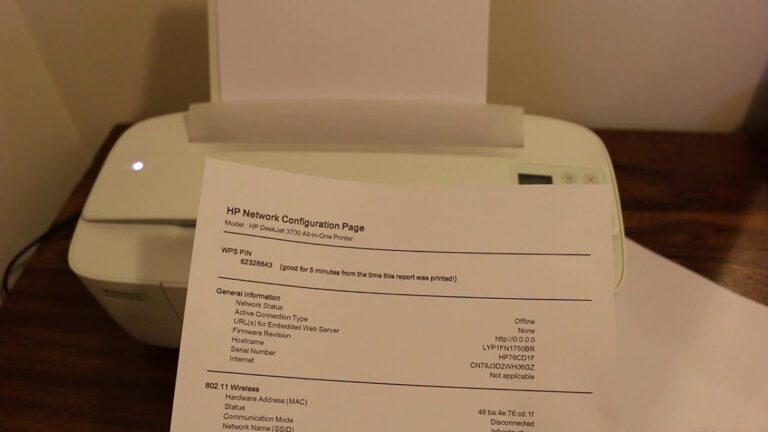
You can find your printer’s MAC address by checking its network settings menu or printing a network configuration page.
Alternatively, access your router’s connected devices list to spot your printer’s MAC address easily.
Is It Possible to Track a Printer Using Its MAC Address?
Tracking a printer by its MAC address is like following a faint scent in a forest—you can identify its presence on a local network, but tracking it beyond that is usually impossible without specialized access or tools.
The MAC address helps recognize the device within the same local area network (LAN). However, it does not provide location details outside that network.
To track a printer beyond the local network, you would need additional information or permissions, such as network logs or access to routers and switches.
Can Multiple Devices Share the Same MAC Address Without Issues?
No, multiple devices shouldn’t share the same MAC address because it causes network conflicts. You’d likely experience connectivity issues and data misrouting.
Each device needs a unique MAC to communicate properly on a network.
Conclusion
So, you’re wondering if you can change your printer’s MAC address—coincidentally, it’s not as simple as it sounds. While you might want to tweak it for network reasons, printers often lock this info down tight.
But don’t worry; sometimes, the best fix isn’t changing the MAC but exploring other network settings. Just remember, before diving in, think about the legal and ethical side—you wouldn’t want a quick fix to cause bigger headaches.
In conclusion, changing the MAC address of your printer is generally not feasible due to hardware restrictions. Instead, consider adjusting other network configurations to meet your needs. Always keep in mind the legal and ethical considerations when attempting to modify your printer’s MAC address.